
The National Elevation Data Strategy team continues to enhance its products, pioneering new approaches to ensure Canadians have the elevation information and tools they need to support their work. This second article in our two-part series takes a closer look at the latest technical improvements to Canada’s national elevation offerings.
In this article, we’re excited to share:
- New tutorials that guide users through the CanElevation product suite, and explain how to perform vertical datum transformations
- Significant improvements to the Automatically Extracted Buildings product.
1. Publication of Tutorials on Using the CanElevation Product Suite
To make it easier for users to work with elevation datasets from across Canada, Natural Resources Canada now offers a series of online tutorials. These resources give developers and geomatics experts practical examples that help them integrate more CanElevation products in their own projects. The tutorials are available as step-by-step technical guides, and several are offered as Jupyter Notebooks, providing an interactive environment for modifying and running the demo code.
Tutorial on Cloud-Optimized Geospatial Access
NRCan increasingly distributes its datasets using cloud-optimized geospatial formats. Cloud Optimized GeoTIFF (COG) files are accessible through a STAC (SpatioTemporal Asset Catalog) catalog. As these technologies have recently grown in adoption, NRCan created dedicated resources to help users take full advantage of them.
The resources on this page include:
- Practical guides on accessing elevation STAC collections using GIS software such as QGIS and ArcGIS Pro
- Python code examples using open-source libraries such as pystac-client (for STAC API discovery) and rasterio
Tutorials on Advanced Use Cases
This collection also features tutorials designed to support more advanced work with Canadian elevation data. These include examples with lidar point clouds and explanations of vertical transformations. Additional advanced content will be added over time.
Current advanced tutorials include:
- Using lidar point clouds, with practical examples of accessing, manipulating, and visualizing the data
- Step-by-step guides for performing vertical datum transformations across different epochs of the NAD83 (CSRS)
- Interactive Jupyter notebooks for analyzing and transforming lidar point clouds, allowing hands-on practice in a Python environment
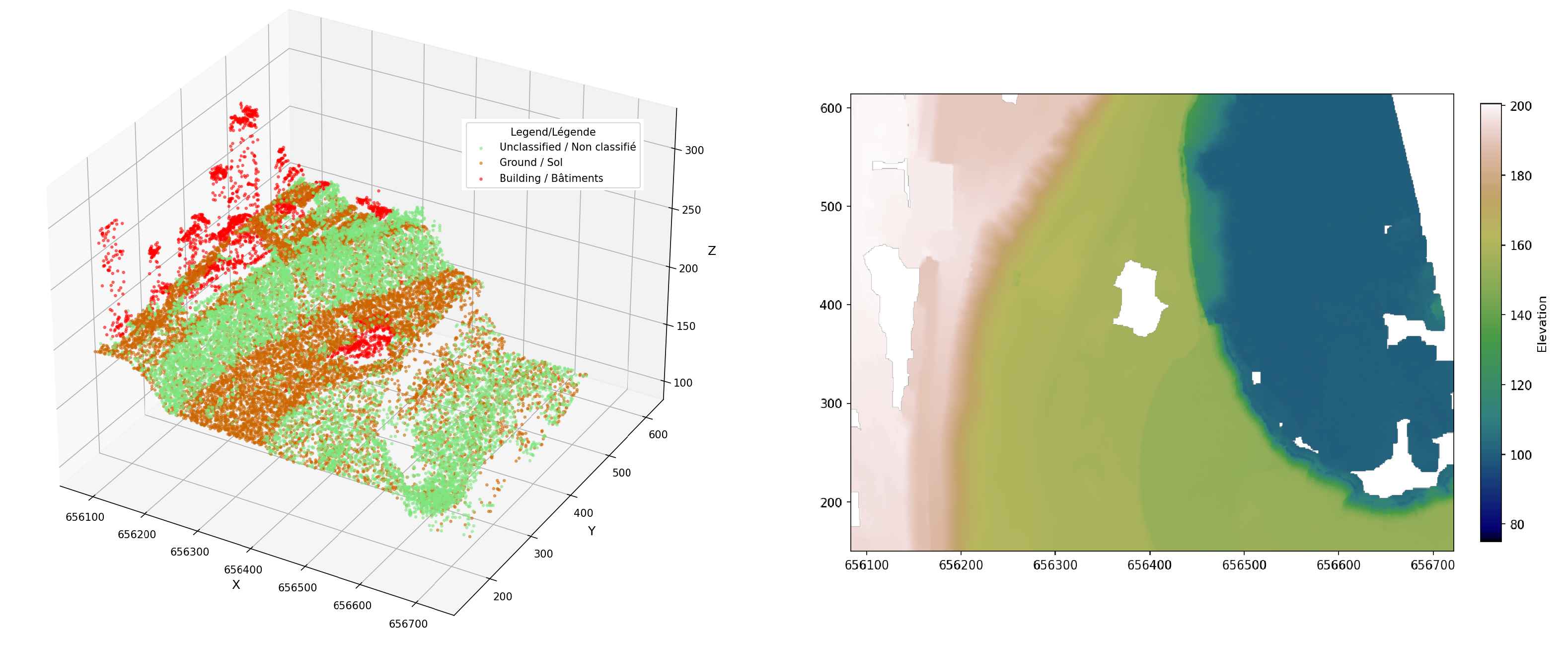
Figure 1: The image on the right shows an elevation data representation produced by following the steps in the tutorial How to Generate a Digital Elevation Model (DEM) from a COPC LAZ Lidar Point Cloud. The image on the left shows the lidar points in 3D.
2. Automatically Extracted Buildings Product: We’re Innovating!
A non‑duplicated building layer is now available
An automatically extracted building layer offering unique, non‑duplicated coverage across the nation is now available. This new layer uses all lidar-derived datasets in NRCan’s inventory, ensuring that areas captured by multiple projects are accurately represented only once. This approach improves overall data quality and consistency (see figure 2) and is fully described in the product specification (PDF, 425 KB).
It is available in GeoPackage (GPKG, 5.4 GB) and GeoParquet (Parquet, 1.9 GB) formats, and also through the Geospatial Data Extraction service.
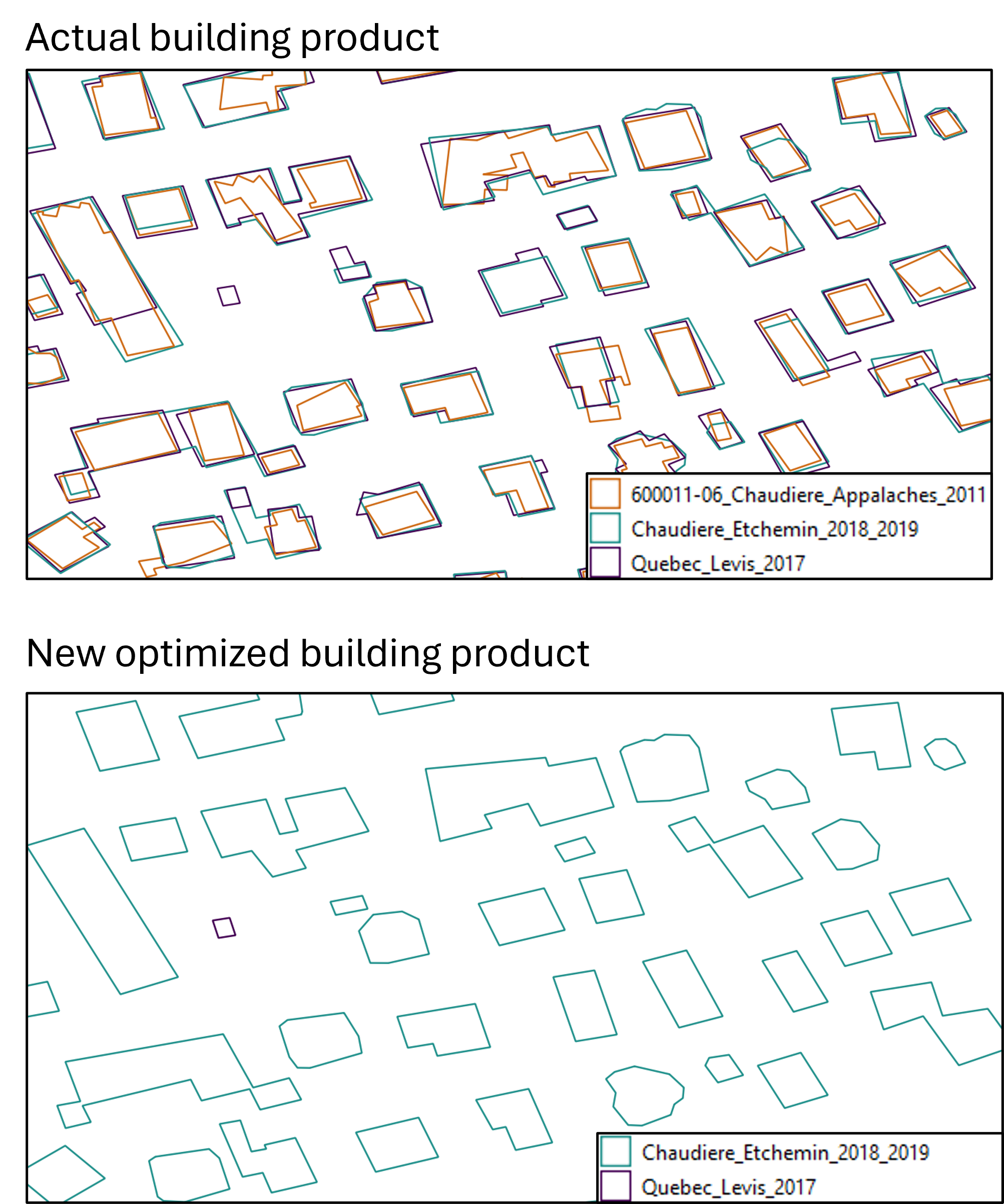
Figure 2: The top image shows different building footprints from multiple lidar acquisition projects. The bottom image shows unified coverage with a single representation per building.
Geospatial Data Modernization with GeoParquet 1.1
As an OGC format designed for cloud environments, GeoParquet is supported by many geospatial tools. The optimized layer is therefore available for download as a GeoParquet file (Parquet, 1.9 GB) and can also be streamed directly from the cloud. This enables users to query only the areas they need without downloading the entire dataset, making analysis faster and more efficient. If you’re new to GeoParquet, we encourage you to explore the user guide for an introduction to its structure and advantages.
Gradual Retirement of the ESRI File Geodatabase Format in Favour of OGC GeoPackage
To support interoperability and open-data standards, NRCan is transitioning away from the ESRI File Geodatabase (FGDB) format in favour of OGC GeoPackage. Currently distributed projects will retain their existing formats while also being made available in OGC GeoPackage format. However, new projects will no longer be published in FGDB. Instead, they will be provided in GeoPackage.